Mathlantis: Build & Brighten!
# Mathlantis: The Lost City of Numbers
Mathlantis is an educational web application that combines mathematical challenges with puzzle-building mechanics. Players solve dynamically generated math problems to recover lost fragments of history and rebuild the legendary City of Numbers across different historical and futuristic zones.
## Overview
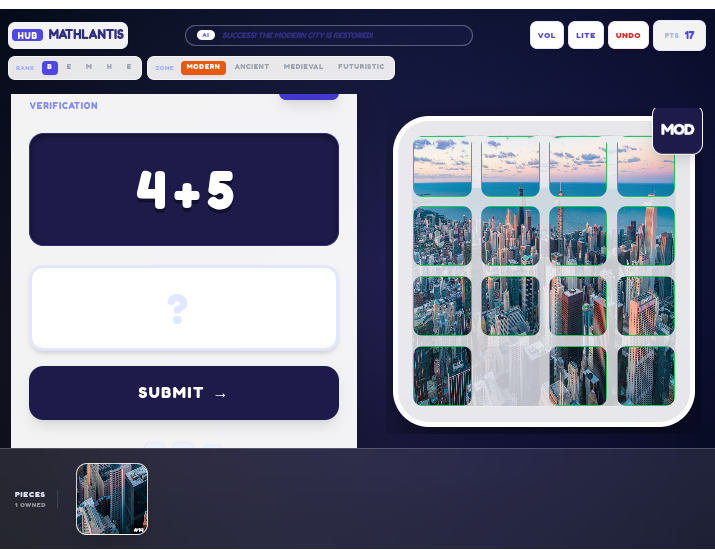
The game challenges players to restore Mathlantis by solving arithmetic problems. Each correct answer provides a unique puzzle piece corresponding to the current world theme. Players must solve the math and strategically place the recovered pieces in their correct grid positions to complete the restoration of each zone.
## Key Features
### Mathematical Challenges
- Progressive Difficulty: The game automatically scales difficulty as you progress.
- Beginner: Addition up to 10 (Ages 5-6)
- Easy: Addition and subtraction up to 20 (Ages 7-8)
- Medium: Larger numbers up to 50 (Ages 9-10)
- Hard: Introduction to multiplication (Ages 11)
- Expert: All operations including division (Age 12)
- Non-Repeating Problems: Questions are tracked to avoid repetition within a session.
- Sound Feedback: Immersive audio cues for correct answers, wrong answers, and building actions.
### City Building and Restoration
- Historical and Futuristic Zones: Modern City, Ancient Egypt, Medieval Kingdom, Futuristic Metropolis.
- Puzzle Grid System: Each zone consists of a 4x4 grid. Players earn 16 unique pieces.
- Drag and Drop Interface: Intuitive placement of earned blocks from the inventory to the construction site.
- State Persistence: Undo functionality to reverse recent construction actions.
### Reward System
- Math Wizard Encouragement: Receive motivational messages as you progress.
- Piece Recovery: Each correct answer earns you a unique piece of the city grid.
- Puzzle Completion: Once all 16 pieces are collected, the math challenge is complete and you can focus on arranging the puzzle.
## Technology Stack
- Core Framework: React 19
- Build Tool: Vite
- Programming Language: TypeScript
- Styling: Tailwind CSS
- State Management: React Hooks (useState, useCallback, useEffect)
## Getting Started
### Prerequisites
- Node.js (v20.19.0+ or v22.12.0+ recommended)
- npm or yarn
### Installation
1. Clone the repository to your local machine.
2. Install the necessary dependencies:
```bash
npm install
```
### Running the Game
Start the development server:
```bash
npm run dev
```
The application will be available at http://localhost:3000 by default.
### Building for Production
```bash
npm run build
```
The production-ready files will be in the `dist/` folder.
## Project Structure
- components/: React components for the math interface, city builder, and UI overlays.
- services/: Modular services for sound effects and math engine logic.
- constants.tsx: Configuration for world themes, colors, and grid settings.
- types.ts: TypeScript interfaces and enums for project-wide type safety.
- App.tsx: Root application component managing game state and logic.
## How to Play
1. The game starts at Beginner difficulty.
2. Solve the math problem displayed on the left side of the screen.
3. Upon solving, a new piece will appear in your inventory (the bottom bar).
4. Drag the piece from your inventory and drop it onto the construction grid on the right.
5. If the piece is placed in its original intended slot, you will hear a success chime.
6. Continue solving problems - difficulty increases automatically as you progress.
7. Once all 16 pieces are collected, arrange them correctly to complete the zone.
## License
This project is private and intended for educational evaluation purposes.